Keyboard Shortcuts and Key Map
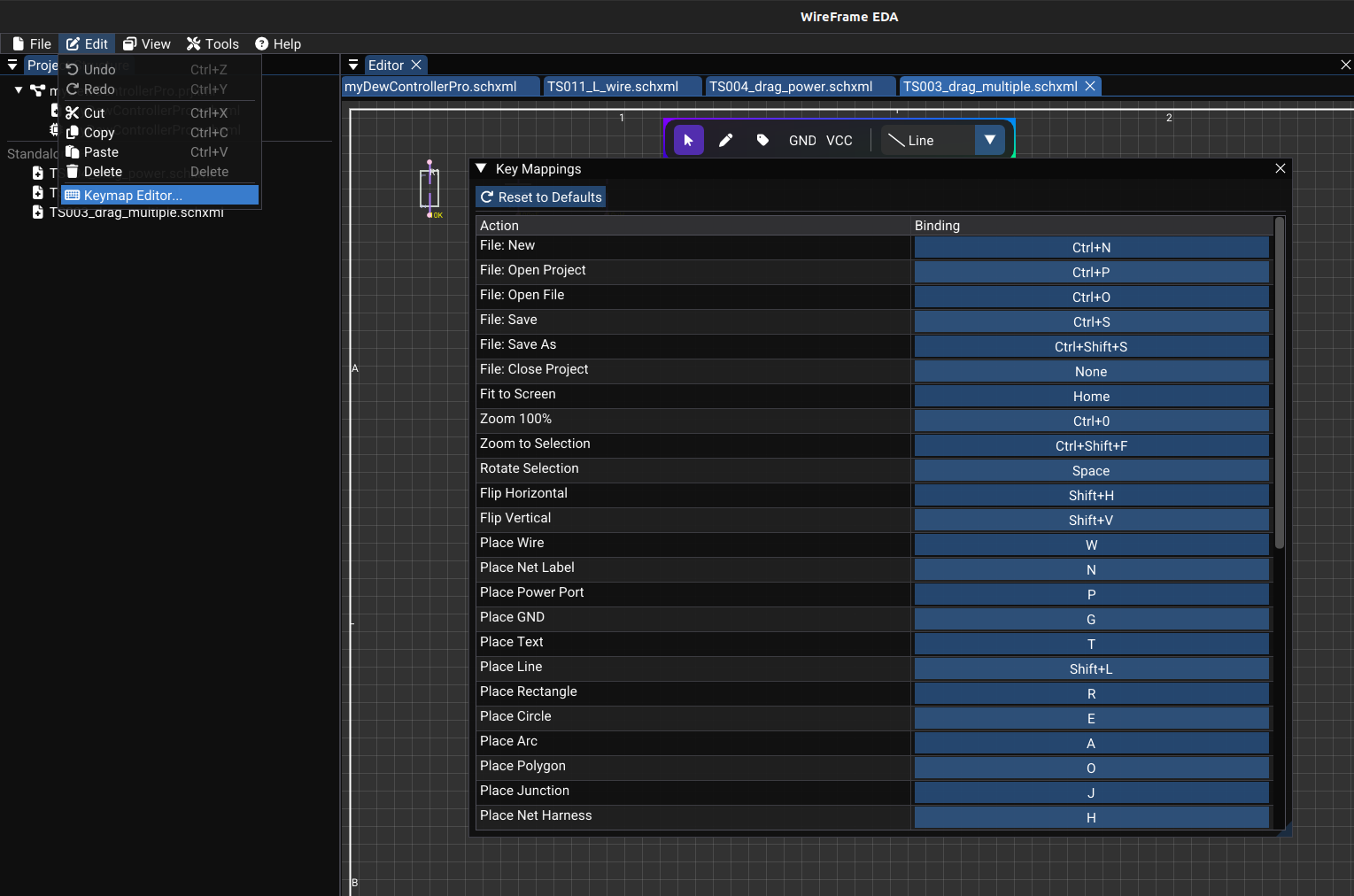
WireFrame lets you customize shortcuts for the actions available in the current build.
Key Map Editor
Accessible from Preferences → Hotkeys in the main menu:
- A list of all actions is displayed with:
- Action name (e.g., "Place Wire", "Rotate", "Undo").
- Current binding (e.g.,
W,R,Ctrl+Z).
- Click a binding cell to start recording a new shortcut.
- Press the desired key combination (e.g., Ctrl+R).
- The binding updates immediately.
- Press Esc to cancel recording.
Bindings are saved in the user configuration and restored on the next launch.
Default Shortcuts — Global
| Action | Default shortcut | Description |
|---|---|---|
| New Schematic / PCB | Ctrl+N | Create a new document |
| Open File | Ctrl+O | Open a file dialog |
| Save | Ctrl+S | Save the active document |
| Save As | Ctrl+Shift+S | Save with a new filename |
| Undo | Ctrl+Z | Undo last action |
| Redo | Ctrl+Y | Redo last undone action |
| Copy | Ctrl+C | Copy selected items |
| Cut | Ctrl+X | Cut selected items |
| Paste | Ctrl+V | Paste from clipboard |
| Delete | Del | Delete selected items |
| Select All | Ctrl+A | Select all items on canvas |
| Open Simulation Workbench | F5 | Open the simulation panel for the active schematic |
Default Shortcuts — Navigation
| Action | Default shortcut | Description |
|---|---|---|
| Fit to Screen | F | Zoom to fit all content |
| Zoom 100% | 1 | Reset zoom to 100% |
| Zoom to Selection | Shift+F | Zoom to fit selected items |
Default Shortcuts — Schematic
| Action | Default shortcut | Description |
|---|---|---|
| Place Wire | W | Activate wire drawing mode |
| Place Net Label | L | Activate label placement mode |
| Place GND | G | Place a GND power symbol |
| Place Text | T | Activate text placement mode |
| Rotate | R | Rotate selected component(s) |
| End Wire | Esc | End current wire drawing |
Default Shortcuts — PCB
| Action | Default shortcut | Description |
|---|---|---|
| Route Trace | X | Activate trace routing mode |
| Place Via | V | Place a via (or switch layer during routing) |
| Move | M | Move selected items |
| Flip | F | Flip selected footprint(s) front ↔ back |
| Rotate | R | Rotate selected items 90° |
Default Shortcuts — Alignment
| Action | Default shortcut | Description |
|---|---|---|
| Align Horizontal | (configurable) | Align selected text attributes horizontally |
| Align Vertical | (configurable) | Align selected text attributes vertically |
Default Shortcuts — Simulation
| Action | Default shortcut | Description |
|---|---|---|
| Run Simulation | (configurable) | Execute the current simulation configuration |
| Abort Simulation | (configurable) | Halt a running simulation |
| Toggle Cursors | (configurable) | Show/hide measurement cursors in the waveform viewer |
Customization Tips
Match your workflow
If you're coming from another EDA tool (KiCad, Altium, Eagle), you can rebind WireFrame's shortcuts to match. Open Preferences → Hotkeys and set your preferred bindings.
Conflict detection
If you assign a shortcut that's already used by another action, the editor will notify you and remove the old binding.
See Also
- Selection & Editing — keyboard operations for selection and clipboard.
- Schematic Editor — schematic-specific tool modes.
- PCB Editor — PCB-specific tool modes.